15 April 2026
Why Your Laptop Battery Deserves More Attention
Your laptop battery quietly powers everything you do. Most people only notice it when things go wrong — the bar that used to last all day now drains by lunch, or the machine shuts off at 15% for no obvious reason. The good news is that a few simple habits can stretch battery life by years, and understanding what's happening inside the pack helps you make smarter decisions when things do deteriorate.
Charging Best Practices
Modern laptops use lithium-ion or lithium-polymer cells. These chemistries behave differently from the nickel-cadmium batteries of the 1990s — there is no "memory effect" to worry about — but they do have their own sensitivities.
Avoid full 0–100% cycles routinely. Lithium cells experience the least stress in the 20–80% range. Charging to 100% every day and running it flat accelerates capacity loss.
Use the manufacturer's charger or a trusted equivalent. Off-brand chargers that deliver the wrong voltage or amperage can cause excessive heat inside the battery, shortening its lifespan.
Enable battery-limit features if your laptop has them. Many modern laptops (Dell, Lenovo, ASUS, HP) ship with a setting to cap charging at 80%. Use it if you spend most of your time plugged in.
Don't leave it on charge indefinitely at 100%. Once full, most laptops stop pushing current to the battery — but the heat from the AC adapter still affects the cells over time.
Let it breathe. Operating a laptop on soft surfaces like beds or sofas blocks the air vents. A hot battery degrades significantly faster than a cool one.
Store at around 50% if not using it for weeks. A fully charged battery sitting unused loses capacity faster than one stored mid-charge.
Understanding Battery Degradation
Even with perfect charging habits, every battery has a finite number of charge cycles. A "cycle" is a full 0–100% charge equivalent — two top-ups from 50% count as one cycle. Most laptop batteries are rated for 300–1,000 cycles before capacity falls to 80% of the original design.
Here is what degradation looks like in practice:
Maximum Charge Capacity Drops
When new, a battery might hold 60 Wh. After two to three years of daily use, that same battery might only store 45 Wh — its maximum charge capacity has fallen. Your laptop believes it's at 100%, but 100% is now three-quarters of what it used to be. This is why run-time shrinks even when the percentage indicator looks fine.
The Battery Depletes Faster
As cells age, internal resistance rises. More energy is wasted as heat during discharge, meaning the actual power delivered to the laptop is lower. You may notice the percentage dropping faster than expected, especially under load — running video calls, compiling code, or gaming.
Unexpected Shutdowns
Aged cells can no longer sustain a consistent voltage under heavy load. The battery management system may suddenly cut power to protect the cells, shutting the laptop off even when the indicator shows 10–20%. This is a classic sign of a battery that has reached end-of-life.
Swelling
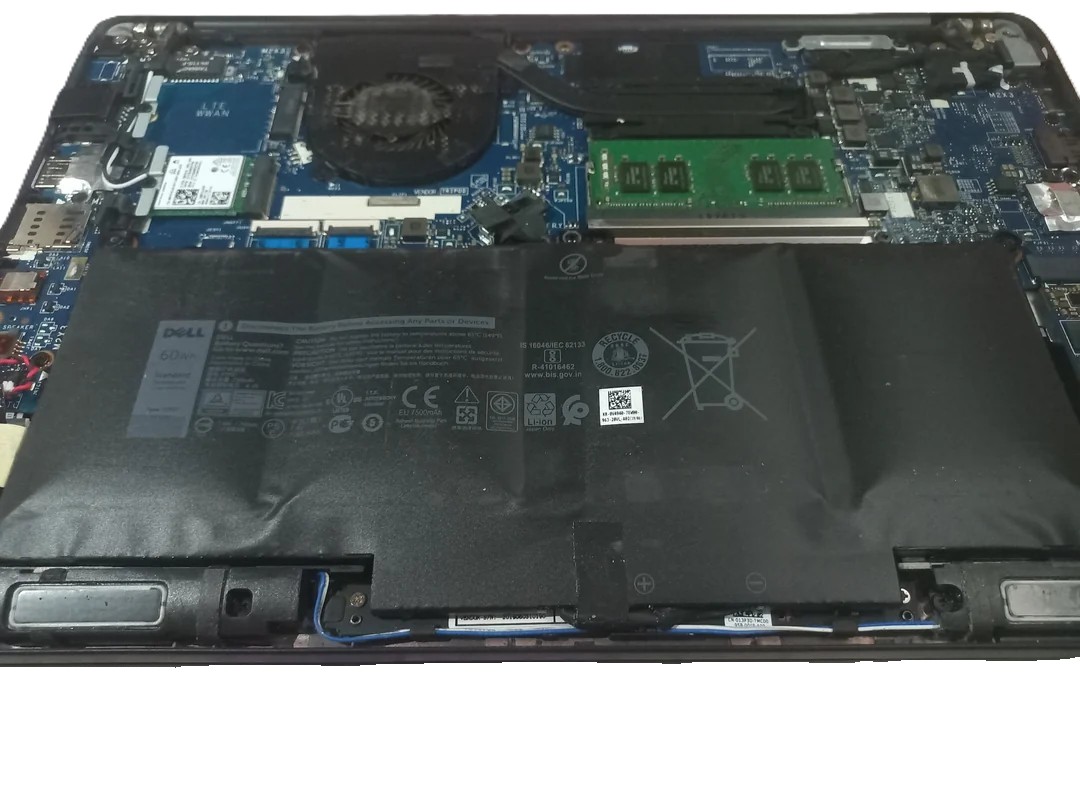
In some cases, aged lithium cells begin to off-gas and swell. A swollen battery can deform the laptop's chassis, push the trackpad up, or prevent the lid from closing properly. If you notice any bulging, stop using the laptop immediately and seek a replacement — a swollen battery is a safety hazard.
Batteries Are Consumable Items — And What That Means for You
This is where many customers are surprised. A laptop battery is a consumable component, similar to a car tyre or printer ink. By design it has a finite service life, and normal wear and tear is expected to reduce its capacity over time.
Under UK consumer rights law (the Consumer Rights Act 2015), goods must be of satisfactory quality, fit for purpose, and as described. However, the law also recognises that consumable parts — items specifically expected to be used up or wear out — are not covered for natural degradation. A battery losing 20–30% capacity after three years of normal daily use is unlikely to be treated as a manufacturing defect.
What is covered:
A battery that fails significantly within the first six months may be presumed defective (the burden of proof shifts to the retailer, not you).
If a manufacturer or retailer made specific promises about battery life in their marketing ("lasts all day for 5 years"), that claim can form part of the contract.
Premature failure caused by a manufacturing fault — such as a cell batch defect — is different from normal wear and may still attract a remedy.
The practical takeaway: if your two-year-old battery holds 60% of its original charge, that is largely normal degradation. If your six-month-old battery holds 40%, that is far outside expected wear and worth raising with the retailer or manufacturer.
Getting Your Laptop Back to Full Health
Battery Replacement
The most straightforward fix is a professional battery replacement. A new OEM-grade or quality-matched battery restores full capacity and eliminates the unexpected shutdowns, fast depletion, and shortened run-time that come with an aged pack. Most laptops can be serviced in under an hour, and the difference is immediately noticeable — you get a machine that effectively runs like new again.
Why Add a Thermal Service Too?
Heat is the single biggest killer of both batteries and other laptop components. Over time, thermal paste — the compound between the processor and its heatsink — dries out and loses conductivity. Dust accumulates in the cooling fins and fan blades. The result is a laptop that runs hotter than it should, throttles its own performance, and accelerates battery wear through the heat alone.
Combining a battery replacement with a thermal service makes sense for one simple reason: if your battery has degraded from heat, there's a strong chance your cooling system contributed. Replacing the battery without addressing the root cause means the new pack is exposed to the same elevated temperatures from day one.
A thermal service typically includes:
Full disassembly and fan/heatsink cleaning
Replacement of dried thermal paste with a high-performance compound
Fan bearing inspection and replacement where necessary
Before-and-after temperature testing to confirm the improvement
Let Us Take a Look
At TopsLaptops, we carry quality replacement batteries for a wide range of laptop makes and models, and our engineers perform both services regularly. Whether you need a quick battery swap, a full thermal service, or both combined, we'll give you a clear quote before we start any work — no surprises.
Book a repair assessment or browse our services to find out more. If you're unsure whether your battery needs replacing, bring it in — we'll run a health check and give you an honest answer free of charge.