
Laptop Thermal Maintenance Service
Laptop Thermal Maintenance Service
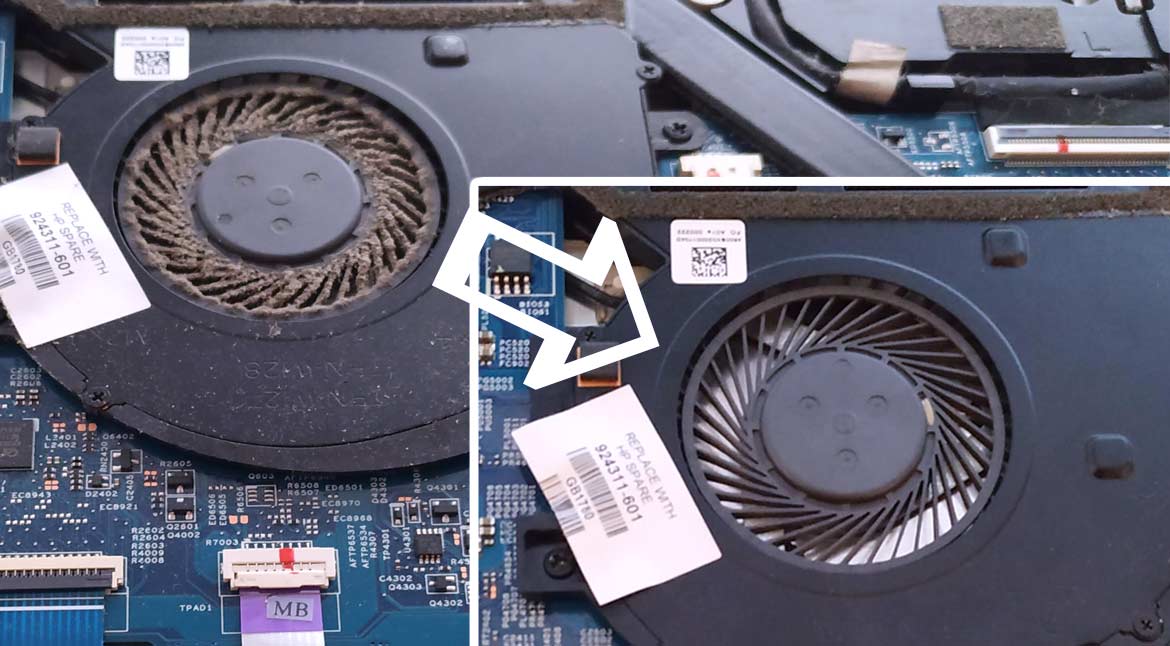
AvailableOver time, dust clogs laptop cooling systems and thermal paste degrades — causing overheating, throttling, and reduced battery life. Our Thermal Maintenance Service cleans the entire cooling pathway, reseats the heatsink, and applies fresh high-quality thermal compound. The result is a cooler, quieter, and better-performing laptop — with improved battery longevity as a bonus.
How It Works
Initial Thermal Assessment. We record the laptop's operating temperatures under load before any work begins, giving us a baseline to compare against after the service and quantify the improvement.
Safe Disassembly. The laptop is opened using appropriate tools for the specific model. All components and screw positions are noted to ensure correct reassembly.
Fan & Heatsink Removal. The cooling fan(s) and heatsink assembly are carefully removed to expose the CPU and GPU thermal interfaces.
Dust & Debris Removal. Dust accumulation is cleared from the fan blades, heatsink fins, vents, and internal chassis using specialist compressed air and brushes. Blocked vents and clogged fins are the primary cause of sustained high temperatures in older laptops.
Thermal Paste Renewal. The old thermal compound — which hardens and loses conductivity over time — is completely removed from both the processor and heatsink contact surfaces. A high-quality thermal paste is applied in the correct quantity and pattern for your chip configuration.
Reassembly & Verification. The heatsink and fan are reseated and secured to the correct torque. All components are reassembled and the laptop is powered on for final temperature testing. We compare readings before and after to confirm a tangible improvement.
Frequently Asked Questions
How do I know if my laptop needs this service?
Common signs include: running noticeably hotter than it used to, louder or more frequent fan noise, performance slowing under load (thermal throttling), or unexpected shutdowns due to overheating. If your laptop is more than 2–3 years old and has never had a thermal service, it is almost certainly overdue.
How much improvement can I expect?
Results vary depending on dust accumulation and how degraded the original thermal paste is. In many cases, CPU temperatures reduce by 10–20°C under load, with noticeable improvements in fan noise and sustained performance. On throttling systems, real-world processing speed can improve significantly.
Will it affect my data or software?
No. This is a purely physical maintenance service — your operating system, files, and applications are not touched.
How often should this be done?
We recommend a thermal service every 2–3 years for most laptops in normal environments. Laptops used in dusty environments — workshops or pet-friendly homes — may benefit from annual maintenance.
Can overheating permanently damage my laptop?
Yes. Prolonged operation at high temperatures accelerates the degradation of the CPU, GPU, solder joints, and capacitors — and shortens battery lifespan significantly. Addressing the thermal system before damage occurs is far more cost-effective than replacing components afterwards.
Does this fix throttling?
In most cases, yes. Thermal throttling — where the processor reduces its speed to prevent overheating — is almost always caused by inadequate cooling. Once the thermal pathway is restored, most laptops return to full sustained performance.
Why Choose a Professional Service?
Attempting thermal maintenance without experience carries several risks:
Overtightening the heatsink can crack the CPU package or damage motherboard solder points
Incorrect thermal paste quantity or application pattern reduces — not improves — thermal performance
Ribbon cables and memory modules are easily dislodged if the disassembly sequence is not followed correctly
Fan connectors are fragile and commonly broken during amateur disassembly
Our technicians work on dozens of laptop models regularly and understand the correct disassembly sequences, torque settings, and paste application methods for each. The service includes a before-and-after temperature comparison so you can see the results directly.